The Threats module centralizes the registration and categorization of all documented hazards or risk vectors that have the capacity to negatively affect the organization. For a structured analysis, the system classifies threats into three main categories: Natural, Technological, and Social.
Access Path
To manage the threat catalog, use the standard navigation path:
- Make sure you are in the Home view of the Main Dashboard.
- Locate the horizontal ribbon of operational indicators and click directly on the card labeled Threats.
- The system will open the administration interface and display in the left sidebar the section for CATALOGS, where this module is located.

The main screen of this section shows a search bar to locate specific risk factors. The central directory lists each registered threat, displaying its name, the default levels of Probability (P) and Impact (I), its current status (e.g., Active), and action controls (view, edit, delete).
Procedure for Creating a Threat
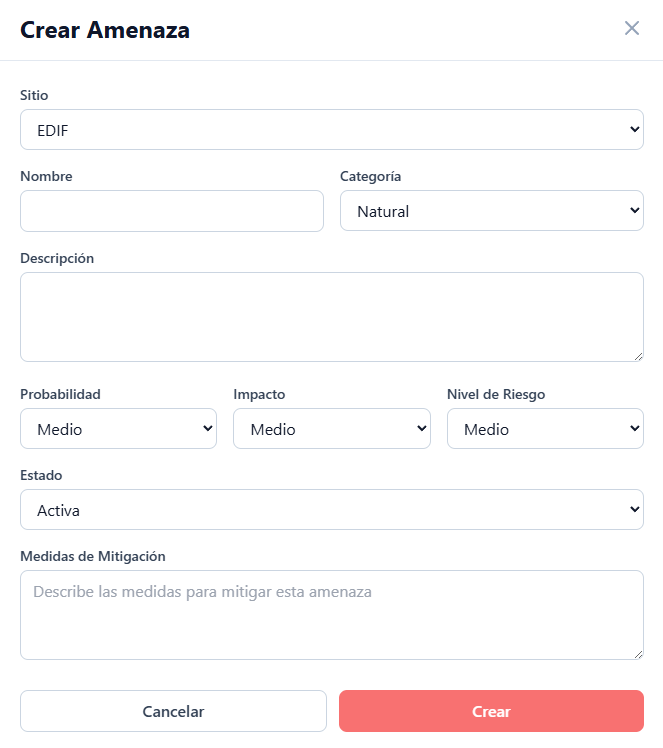
To add a new threat to the catalog, click the + Create Threat button located in the upper right corner. This action will open a data entry form with the following fields:
- Site: Mandatory selector to link the threat to the corresponding facility.
- Name: Text field for the threat identifier (e.g., Earthquake, Cyberattack, Robbery).
- Category: Dropdown menu to classify the risk origin. The available options are Natural, Technological, or Social.
- Description: Free text area to detail the nature of the threat and its possible mechanism of impact.
- Probability: Selector to define the expected frequency of occurrence (e.g., Medium).
- Impact: Selector to estimate the severity of consequences if the threat materializes (e.g., Medium).
- Risk Level: Dropdown menu to establish an initial or inherent risk rating, derived from the relationship between probability and impact.
- Status: Selector to indicate whether the threat is currently active or inactive in the assessment environment.
- Mitigation Measures: Extended text area to preliminarily document recommended actions or controls to contain or reduce the impact of this risk factor.
To finalize the registration and add the threat to the site’s catalog, press the Create button. If cancellation of the process is required, the Cancel button will close the window without applying changes.